Koma - AI Manga & AI Comics
TUNESPHEREComics
3.733.00 Reviews
- Version
- 1.0.7
- Installs
- 10.00K
- Age Rating
- Everyone
Screenshots
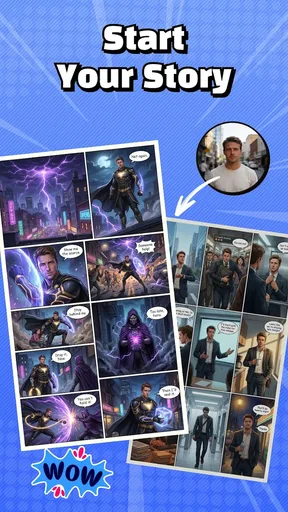
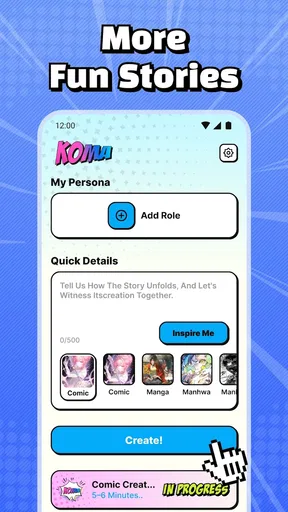
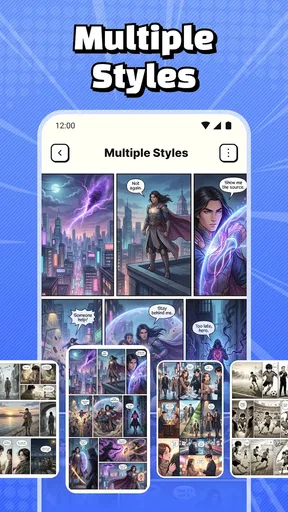
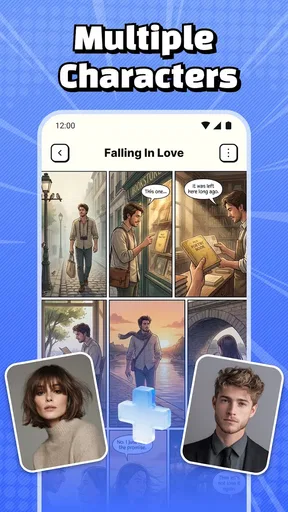
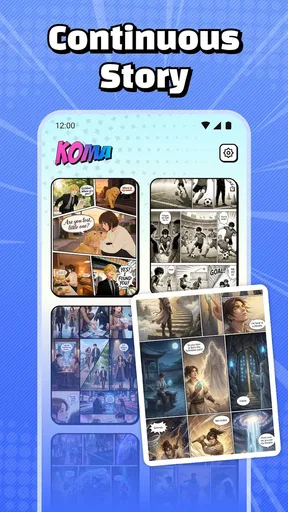
Our Review of Koma - AI Manga & AI Comics
 Analysis by Appyee
I like the idea behind Koma - AI Manga & AI Comics: turning a story concept into a comic without making drawing ability the first hurdle. It is an AI comic-making app from TUNESPHERE, and its broad range of art styles gives beginners a way to explore visual storytelling while keeping the focus on characters and scenes. I would approach it as a creative starting point rather than a replacement for a personal drawing practice or a finished, professionally illustrated book.
When a connection becomes part of the creative process
AI-generated artwork is the heart of this kind of workflow, so I would expect a reliable internet connection to matter when creating or changing images. That shapes how I would use the app: I would draft the premise, character notes, and rough dialogue before opening a generation-heavy session, rather than trying to invent everything while waiting on a connection. A prepared brief makes each creative session more focused and reduces the temptation to send vague prompts that may not match the scene I have in mind.
For example, I might write a short scene about two friends meeting at a station, then note what each character is wearing, their expressions, and the mood of the setting. Those details give the art process more direction than a broad request like “make a manga scene.” I would still expect to adjust my ideas as the images take shape, but separating planning from generation is a useful habit when network quality is uneven.
Better suited to a deliberate session than a rushed moment
On a phone, Koma is appealing when I have a few uninterrupted minutes to develop an idea, but comic creation is not always ideal as a stop-and-go task. A commute with patchy reception, a crowded waiting room, or a quick break between errands can interrupt the flow if an image needs to be generated or revised. I would use those small gaps to jot down scene ideas and save the actual visual work for a place where the connection is steadier.
That distinction also helps set expectations for mobile use. The screen can make it convenient to sketch out a story wherever inspiration strikes, but judging a page’s composition or checking fine visual details is easier when I can slow down and look closely. If your main goal is to make a polished comic page in a single brief sitting, a larger-screen drawing setup may be more comfortable. If you mainly want to turn a passing idea into a visual experiment, a phone is a natural place to begin.
Handling a stalled generation without losing the idea
Any connection-dependent creative tool can feel frustrating when a request takes longer than expected or a session is interrupted. I would keep a separate note with the premise, character descriptions, and scene sequence before starting a longer project. That way, if I need to leave the app or try again later, the creative decisions are not trapped in my memory. I would also work in small batches: settle one scene or character direction before moving on, rather than building a long sequence around an image I may later want to change.
This is not just a technical precaution; it is a creative one. AI output can take a story in an unexpected direction, and a saved written outline gives me a reference point when deciding whether to accept that surprise or revise the prompt. I would treat generated artwork as a draft to evaluate, not as a guarantee that every visual detail will match my mental picture on the first attempt.
Keep the workflow mindful of data and spending
If you are careful about mobile data, it makes sense to do the text planning first and reserve image creation for a trusted connection. I would avoid repeatedly generating near-identical versions just to chase a tiny change; clearer instructions about the character, framing, and mood are a better first step. This also makes the process feel more intentional, especially when a project grows from one playful panel into a sequence of scenes.
The app is free to download, though in-app purchases range from $4.99 to $79.99 per item. I would check the purchase details in the app before committing to a paid option, and decide what I want to make before spending. With a 3.7 average from 276 ratings, it has attracted a modest audience, but that figure is only one part of deciding whether its particular creative approach suits you. It has 10K+ installs, is rated Everyone, and its current version is 1.0.7; it was released on Dec 31, 2025, and the minimum OS is 8.1.
Those details matter most if you plan to use the app regularly. A casual experiment may be enough to tell you whether AI-assisted comic creation fits your habits, while a longer project calls for a closer look at the costs and the amount of iteration you expect to do. I would not start by assuming that every part of a large project will be free; I would first explore the available workflow and make purchase decisions only when I understand what I actually need.
The Magic of AI-Driven Creativity
With Koma - AI Manga & AI Comics, the world of manga and comics is at your fingertips. First off, let’s talk about how the app uses AI to transform your ideas into stunning visuals. You simply input your story elements, and the app does the heavy lifting by generating illustrations that align with your narrative. It’s like having a talented artist in your pocket, ready to bring your stories to life.
The user interface is sleek and intuitive, which means you don’t need to be tech-savvy to get the hang of it. As soon as you open the app, you're greeted with a clear, well-organized dashboard where you can start creating your project. The whole process feels like a guided tour, making it easy for newcomers and seasoned creators alike to jump right in.
Features That Stand Out
So, what makes this app a game-changer? Let’s break down some of its standout features:
- AI-Powered Art: The AI technology behind Koma generates high-quality, detailed illustrations, allowing you to focus on storytelling rather than art skills.
- Customizable Characters: You can customize characters to fit your vision, tweaking everything from hairstyles to outfits.
- Storyboarding Tools: The app includes easy-to-use storyboarding tools that help you organize your plot and structure your comic with ease.
- Community Sharing: Once your masterpiece is ready, you can share it with the Koma community or export it to share with friends and family.
Getting Creative: My Personal Experience
Trying my hand at creating a comic was both fun and surprisingly easy. I started by outlining a simple story idea. The app guided me through setting up scenes and characters. The AI-generated art was impressive, capturing the essence of what I had envisioned with minimal input from me. This allowed me to focus on refining the plot and dialogue, which was a refreshing change from struggling with the art aspect.
One of the most enjoyable parts was customizing the characters. I spent a good chunk of time playing with different styles, which felt like a creative playground. It was also exciting to see how the AI adapted to my choices, producing artwork that was uniquely mine.
Choosing it over other comic-making approaches
Compared with drawing apps, Koma places more of the visual work in the hands of AI and less in the hands of the user. That makes it a better fit for someone who has story ideas but does not want to spend time learning brushes, layers, or figure drawing before making a first page. A traditional comic editor is usually the stronger choice if you want precise control over every line, panel border, and expression, or if you already have a distinctive hand-drawn style you want to preserve.
It also differs from writing a script in a notes app and commissioning or collaborating with an artist. Koma can help turn an idea into a visual draft more directly, which is useful for testing whether a scene reads well. But anyone making a comic for a specific audience, client, or publication may prefer a human artist’s consistency and detailed control. I see the app as a bridge between an outline and a visual prototype, not an automatic shortcut to a finished book.
Who will get the most from it
I would recommend trying it if you enjoy inventing characters, settings, and short stories but feel blocked by the drawing stage. It could be a fun way for a fan to make a small personal comic, for a writer to explore a scene visually, or for a group of friends to turn an inside joke into a few panels. The ability to work with different art styles is especially useful when you are still figuring out what visual mood fits your story.
I would be more cautious if your priority is exact visual continuity across many pages. Readers notice when a character’s face, clothing, or proportions shift between scenes, so I would check each image carefully and avoid assuming that a character description alone will make every panel perfectly consistent. Likewise, people who want to draw manually, keep complete control over every artistic choice, or avoid paid in-app options may be happier with a conventional drawing tool.
A small project is a sensible first test
For a realistic first session, I would make a short scene rather than begin with a sprawling series. Imagine a student discovering a mysterious note in a library: write down the characters, the location, and the emotional beat of each moment, then build a few scenes around that arc. This gives you a chance to see whether the generated visuals support the story and whether character customization feels flexible enough for your needs, without committing to a large project before you know how the workflow feels.
One practical tip is to keep character descriptions stable in your own notes and reuse the same key details when you work on later scenes. Another is to decide the purpose of each panel before generating it: a close-up meant to show surprise needs different framing from a wide shot meant to establish the setting. Those choices can make prompts clearer and help you judge results against the story rather than simply choosing whichever image looks most dramatic.
Final Thoughts: Is It Worth the Download?
In a word, yes! Koma - AI Manga & AI Comics offers a novel way to create comics without the need for artistic prowess. It’s an app that caters to both hobbyists and aspiring comic creators, providing all the tools necessary to bring your stories to life. While it may not replace the nuanced touch of a professional artist, it’s a fantastic starting point for anyone interested in exploring the world of comics and manga.
Whether you’re a seasoned storyteller or just someone looking to dabble in comic creation, this app is well worth exploring. Its blend of AI technology and user-friendly design makes it a standout choice in the realm of creative apps. So, go ahead and give it a try—you might just create your next favorite comic!
My connectivity verdict
I would treat Koma as a connected creative workspace and plan around that: draft ideas when convenient, then focus on generating and reviewing art when the network is dependable. That approach suits quick experiments and compact stories particularly well, while long sessions on unreliable mobile data may interrupt momentum. If you are happy to guide AI rather than draw every detail yourself, it is an inviting way to explore comic-making; if you need precise, repeatable artwork or a fully hands-on illustration process, a conventional drawing app is likely the better fit.
Verdict
Strengths of Koma - AI Manga & AI Comics
- Innovative AI-generated manga art.
- User-friendly interface for easy navigation.
- Regular updates with new content.
- High-quality, detailed comic visuals.
- Interactive community features.
Limitations of Koma - AI Manga & AI Comics
- Limited offline functionality.
- Occasional AI errors in text.
- Some features require a subscription.
- Limited language options.
- In-app ads can be intrusive.
Other Releases by TUNESPHERE
View All
Sondo - AI Music Video & AI MV
Music & Audio3.5
Similar Picks in This Category
View All
WEBTOON: Manga, Comics, Manhwa
NAVER WEBTOON4.6

MangaToon: Comic & Manga
MangaToon4.3

네이버 웹툰 - Naver Webtoon
NAVER WEBTOON4.3

Tapas – Comics and Novels
Tapas Entertainment Inc.4.2

Lezhin Comics - Daily Releases
LEZHIN ENTERTAINMENT3.3

WebComics - Webtoon & Manga
WEBCOMICS HOLDINGS HK LIMITED4.4
Frequently Asked Questions
What is Koma - AI Manga & AI Comics used for?
Koma - AI Manga & AI Comics is an innovative app designed to create and read manga and comic content using artificial intelligence. It provides tools for generating unique manga styles and stories, perfect for enthusiasts and creators looking to explore AI-driven creativity. The app aims to blend traditional manga artistry with cutting-edge technology.
How does the AI feature work in Koma?
The AI feature in Koma utilizes advanced algorithms to generate manga-style artworks and stories. Users input their preferences or themes, and the AI crafts unique panels and narratives. This allows for personalized comic creation without requiring extensive drawing skills, making it accessible for both amateurs and seasoned artists.
Is Koma suitable for beginner manga creators?
Absolutely! Koma is designed to cater to all levels of manga creators, from beginners to experts. The intuitive interface and AI assistance simplify the creative process, allowing beginners to produce professional-looking comics. Tutorials and guides are available within the app to help users get started and maximize their creative potential.
Does Koma require an internet connection to function?
While Koma can be used offline for basic features, an internet connection is required to access the full range of AI functionalities and updates. Online connectivity ensures that users receive the latest AI models and improvements, enhancing the overall experience and output quality of the comics and manga created.
Are there in-app purchases or subscriptions in Koma?
Koma offers a free version with basic features, but users can opt for in-app purchases or subscriptions to unlock premium tools and content. These may include advanced AI features, exclusive manga styles, and additional storage for creations. Subscriptions provide ongoing updates and new features, ensuring users have access to the latest innovations.
